I built a regtech web-app without writing a line of code. Here's what it taught me about AI in legal work
A few weeks ago I had never opened Terminal on my Mac. Since then I've built a working third-party risk management tool – multi-user, role-based, stage-gated, with versioned questionnaires, an audit trail and CSV export – without writing, or reading, a line of code. Not a prototype: the kind of thing a fintech's legal and compliance function would otherwise buy as a SaaS subscription or assemble from spreadsheets, forms and a shared inbox.
The technique has an unserious name, "vibe coding", which undersells what's happening. This is a note on how it actually went, how long it took, what the lawyer's job turns out to be when the AI does the building, and where I'd draw the line.
What got built
A third-party risk management (TPRM) workflow. A business team submits a request to engage a new supplier; a criticality questionnaire scores it Critical, High, Medium or Low, which sets how deep the due diligence goes; Finance, Security, Legal and (where personal data is involved) Privacy run their reviews in parallel; nothing is cleared to sign until every applicable gate approves; the signed contract is uploaded and the supplier lands in a register with renewal and notice dates, periodic re-review, offboarding and a full audit trail.
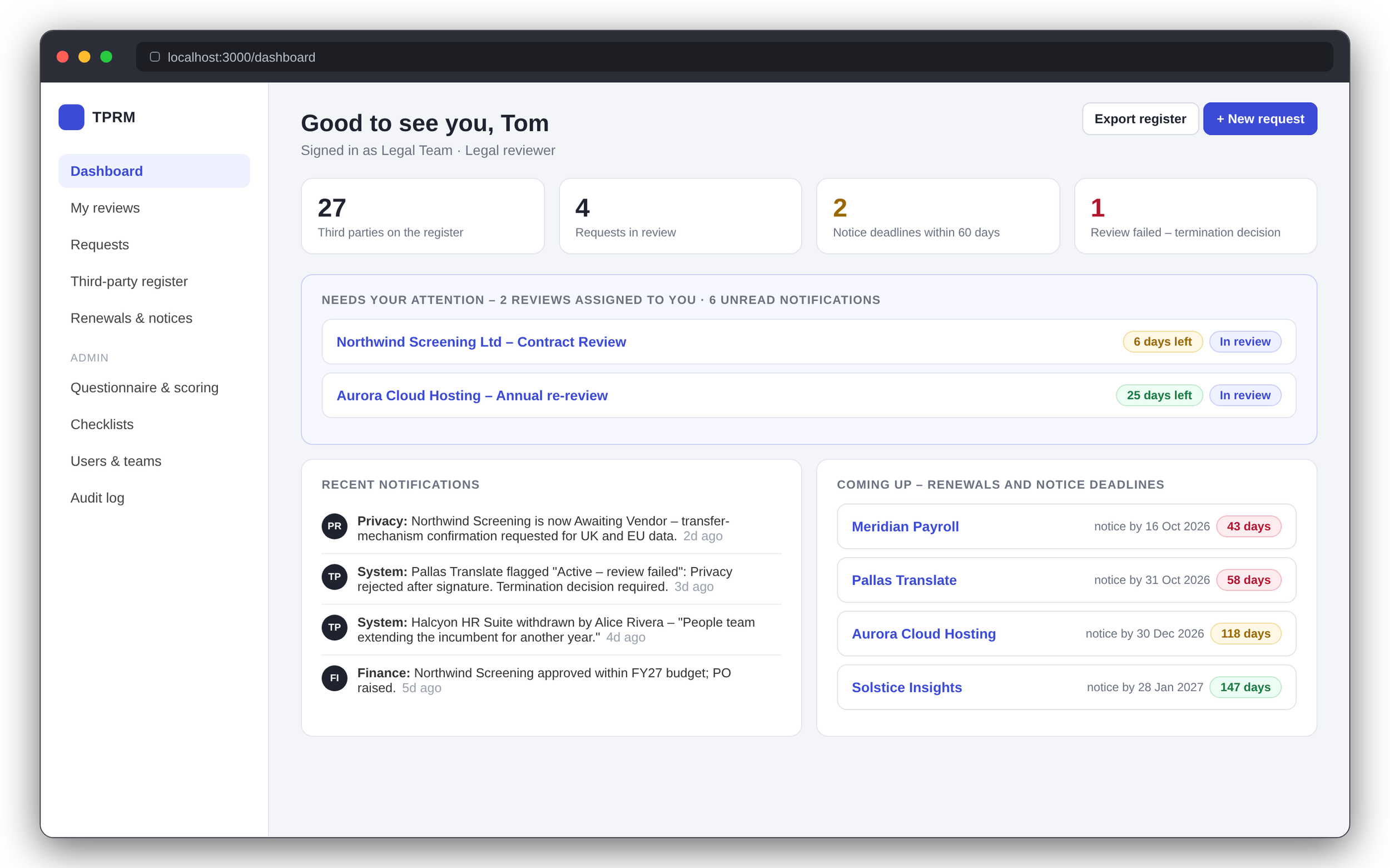
The field set is shaped so a client could answer to the EBA outsourcing guidelines, DORA's register of information, APRA CPS 230 or the MAS outsourcing guidelines – the tool doesn't cite them, but it was designed with them open on the desk. The register is where that shows: every supplier carries its tier, its state, who owns it, what it costs, when it renews, when notice has to be given and when it is next due for re-review.
How long it took
About two weeks of evenings. That's the honest number, and most of it wasn't building.
The first evening was spent working out what Terminal is and how to open it, install the coding agent and get it to run a project – the kind of thing a developer does without thinking and a lawyer has never had a reason to do. The next hurdle was permissions. A coding agent asks for approval before it runs anything, which is safe and also slow, so I had to learn what an auto-approval mode actually does, when it's reasonable to switch it on (local files, a local database, nothing internet-facing) and when it absolutely isn't (credentials, deployment, anything outside the project folder, anything touching a client). Getting that right took reading, and a few cautious sessions, before I trusted it.
Then testing. Clicking through every screen as every role after every session is tedious, and I was the bottleneck. The gain came from working out how to get the AI to help – seeding realistic test users and data so screens weren't empty, generating a numbered test script at the end of each build, and eventually running an independent review pass between sessions that read the changes and walked the live app before I did. Alongside all of that was the slow work of understanding the security posture and the limits: what the agent could reach on my machine, what "local only" really meant, what I'd need to change before anything left my laptop.
In other words, a big learning curve the first time round, and a fortnight is what it cost.
Two caveats. The tool isn’t perfect, and there is always scope to improve on what I've built. I'm not claiming what I produced is at the level of an established regtech vendor with an army of software engineers behind it. But it's good – for what I want, on my process, customised to my preferences in a way I could never get from an out-of-the-box product. And each build gets faster and easier as the fundamentals settle.
How it works, in plain terms
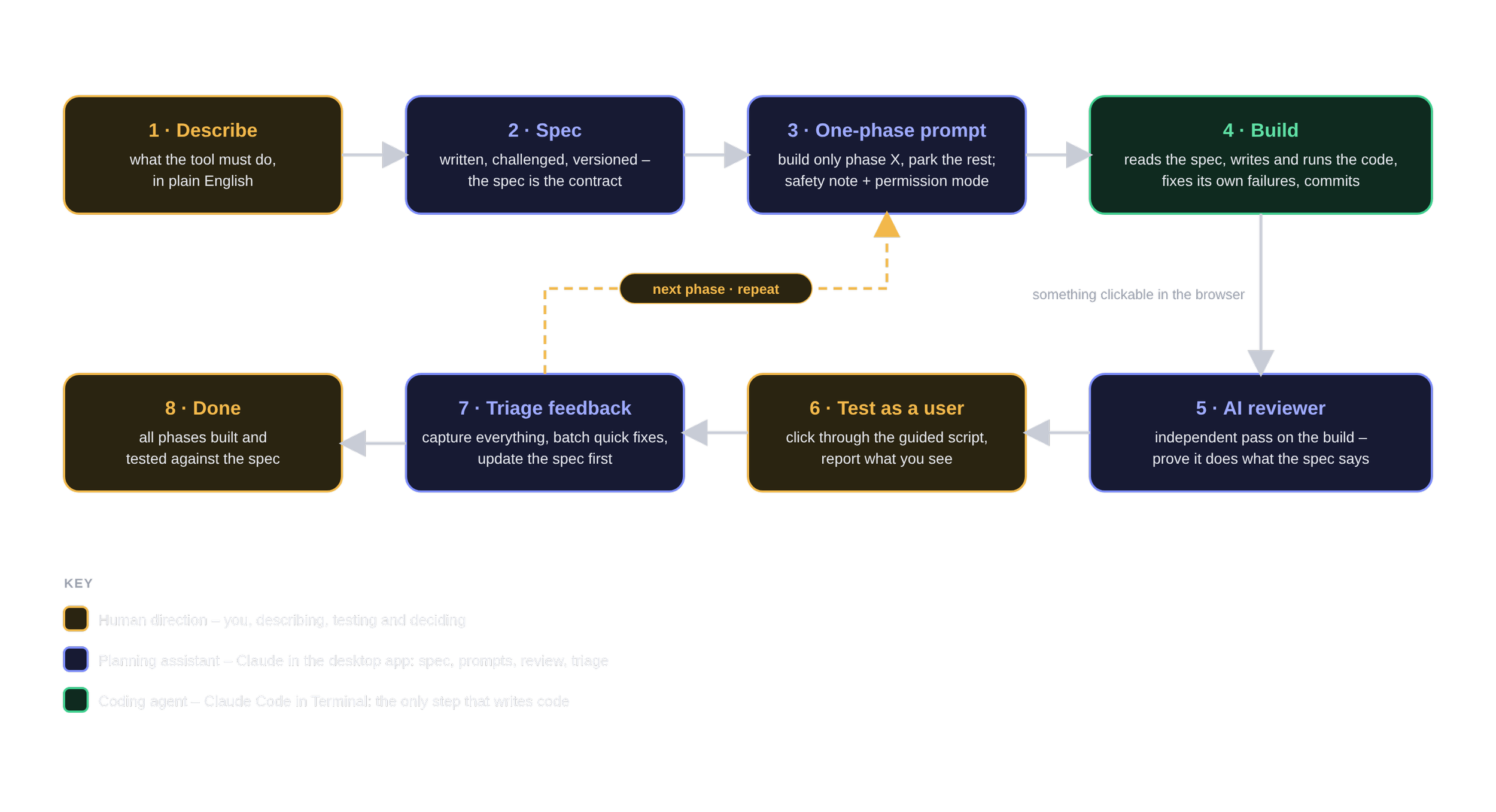
Three roles. Me, a planning assistant and a coding agent – and only the last of those writes code.
Me – the client and the tester. I describe what I want in plain English, test in the browser and arbitrate the trade-offs. I never need to read code. For the TPRM tool that meant an opening brief something like this:
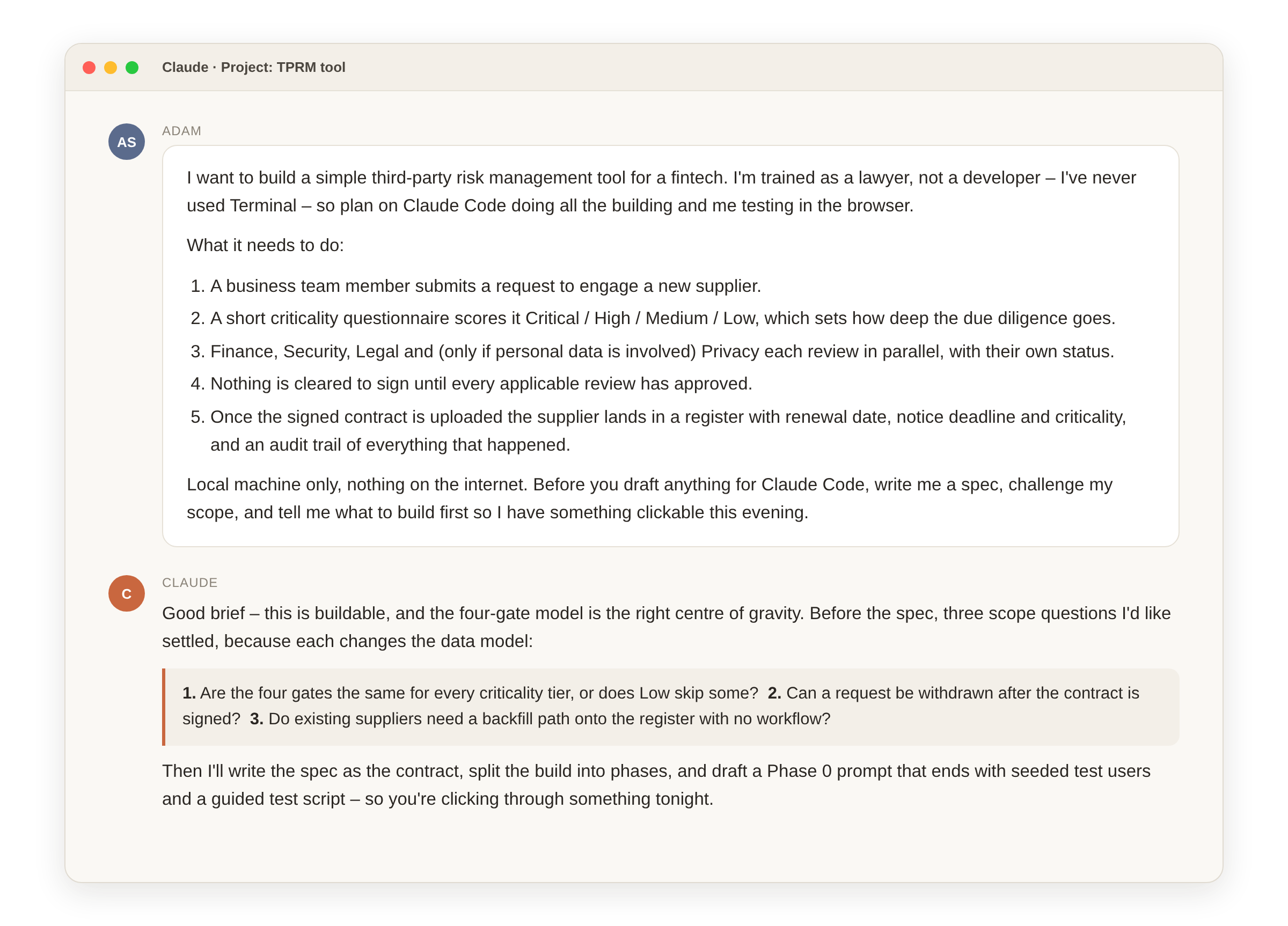
The planning assistant – product thinking. Claude, in its desktop app, turns that brief into a written specification, argues with me about scope, sequences the build into phases and drafts one build instruction per session – each with a note on what the session will touch and which permission mode it needs. It never builds.
The coding agent – the builder. Claude Code, running in Terminal on my laptop, reads the spec, writes the software, runs it, fixes its own failures and commits the result. It never decides product scope.
The seam between "product thinking" and "building" is deliberate. The specification is the contract. It's versioned, it lives in one place, and every build session starts by re-reading it. When I wanted something changed – say, that a request could be withdrawn even after the contract was signed, because someone had clicked "I agree" on a trial that turned into a live service – the change went into the spec first and the build second. Never the other way round.
What the lawyer's job turns out to be
I expected to learn a bit of programming by osmosis. I didn't, and I didn't need to. What I did a great deal of is work that will look familiar to anyone who has run a regulatory project.
Writing the requirements precisely. "Nothing can be signed until all gates approve" sounds clear until you ask: applicable gates, or all four? What if Privacy was never triggered? Can a rejected review be reopened, by whom, and does that need a reason? Most of my time went on questions like these. The AI will happily build whatever you didn't specify, so the discipline is the same as drafting: say what you mean, and say what you don't mean.
Scoping one phase at a time. Every session built one coherent thing and explicitly parked the rest ("do not build offboarding yet – but structure the database so it slots in later"). It kept the testing digestible and stopped the build wandering. Anyone who has run a remediation programme in phases will recognise the logic.
Testing like a user, not a developer. I never read the code. I logged in as the requester, then as the Security reviewer, then as the Admin, and checked whether the thing behaved the way the process is supposed to. Feedback was captured in full first, then implemented in batches – quick fixes together, structural changes one at a time with a test in between. Fifteen changes made blind is how you lose a week.
Arbitrating trade-offs. Should risk acceptance be reserved for senior roles? Should the offboarding checklist be configurable? Those aren't coding questions. They're the questions a compliance lead would ask, and the AI rightly put them back to me rather than guessing.
Getting an AI reviewer in. Between build sessions, the planning assistant ran a separate review pass that read the changes, walked the live application and tried to prove – not infer – whether each feature did what the spec said. Findings got their own numbered series and fed into the next session. It's the same instinct as a second pair of eyes on a regulatory return, and it caught things I wouldn't have.
Put together, the loop looks like this:
The safety model matters more than the tooling
This is the part I'd want any legal or compliance team to take seriously before trying it.
A coding agent that can run commands on your machine is a powerful thing, and the permission settings are not a formality. My rule set is simple: an autonomous mode is fine for local-only work – project files, a local database, version control, package installs. Anything involving secrets or credentials, network actions beyond installs, deployment, deletion outside the project folder, or – above all – a client's environment, gets explicit approval prompts and a dedicated safety briefing first. The tool was built to run only on the local machine, with nothing internet-facing, which makes it secure by construction while it's being developed. That is a design choice, not an accident.
Treat the build the way you'd treat any other AI use in a regulated firm: know what data it touches, know what it can reach, and be able to explain both.
What I wouldn't do
I would not hand a self-built tool to a client, or put it anywhere near live customer data, on the strength of a vibe-coded build alone. Getting a working application is the easy part now. What hasn't changed: hosting and access control, security review, data protection assessment, backup and retention, licensing and support terms, and someone accountable when it breaks at 5pm on a Friday. Those need proper engineering and proper legal work, and the second of those is squarely my job rather than the AI's.
I'd also be wary of the temptation to build everything. The case for a self-built tool is strongest where the process is genuinely yours – a workflow that off-the-shelf products approximate but never quite fit – and weakest where the market already does the job well and the real cost is in the data, not the software. A TPRM workflow shaped around a specific fintech's gates and regulatory anchors is a good candidate. A general ledger is not.
Who this is for
A word on why I could do this at all. I'm a self-employed consultant with my own environment: my own laptop, my own admin rights, my own decision about what runs on it. Most lawyers and compliance professionals who are employees won't have that on a work-issued device – installing a coding agent and letting it run commands is exactly the kind of thing a sensible IT policy blocks, and should.
That isn't a reason to sit it out. Nothing about learning to vibe code needs client data, privileged material or your employer's systems. A personal laptop at home, a subscription and an idea for a tool you wish you had are enough to learn the discipline – writing a spec, scoping a phase, testing like a user, reading a permission prompt before you approve it. That's upskilling for a future in which this is a normal part of legal and compliance work, and it can be done entirely on your own time and kit.
If you then want a tool you've built to run inside your employer's environment, that is a different conversation, and it starts with the Security team – not after the build, before it. Where it would be hosted, what it can reach, who can log in, how the data is protected and backed up, what happens when it breaks. Those are their questions to ask and yours to have answers for, and a tool that arrives with those answers already written down is a very different proposition from one that arrives as a surprise.
What it means for legal and compliance teams
Three things, I think.
The gap between "we need a tool for this" and "we have a tool for this" has collapsed, for a defined class of internal process tools. The constraint is no longer engineering budget. It's whether someone can write down the process precisely enough to build against – and that is a skill legal and compliance teams already have.
The lawyer's value in this loop is judgment, not code: requirements, scope, testing against the process, the trade-offs, the safety envelope. Vibe coding doesn't make the legal function redundant; it makes the analytical parts of the job the bottleneck, which is a good place to be.
And it changes the build-versus-buy conversation for a fintech's second-line functions. I'm now working out what it would take to turn this tool into something clients can run in their own environments, with the engineering and legal wrapper that deserves. If your team is weighing a SaaS subscription against a spreadsheet for third-party risk, it may be worth a conversation before you sign either.
This post describes an internal tool built for FLC's own use and evaluation. The screens shown are illustrative mock-ups; all names and figures are fictional. It is not legal advice, and nothing in it is a recommendation to deploy AI-built software in a regulated environment without appropriate technical and legal review